Passed · virtual-machine testing
Desktop fundamentals
Fresh login. Start navigation. Store presentation. Shelf grouping and minimize/restore. Spotlight application launches. Genuine logout and relogin. Normal boot and shutdown.
Glass Squares OS
In development
Focused. Calm. Beautiful. Yours.
An independent Linux desktop bringing a distinctive glass interface, familiar controls, and a shared visual language to everyday computing.
First desktop milestone passed in VM testing.
Public release still ahead.
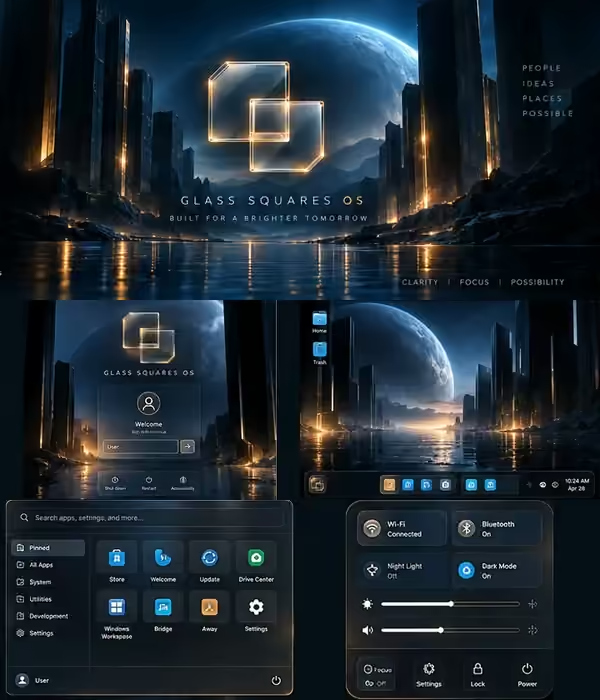
Glass, depth, and a shared visual language.
Launch, switch, search. Keep your bearings.
Connected surfaces. Separately built tools.
Building on Linux, Plasma, and KWin.
Current build state
First desktop milestone passed
The integrated desktop passed its first acceptance milestone in a virtual machine. It is a working development build, not a finished OS or a public beta.
Latest accepted checkpoint ·
Passed · virtual-machine testing
Fresh login. Start navigation. Store presentation. Shelf grouping and minimize/restore. Spotlight application launches. Genuine logout and relogin. Normal boot and shutdown.
Next · not started
The next shell phase brings deeper work on audio, networking, power, notifications, and session controls. Full application workflows still need broader validation.
Ahead · not yet validated
This candidate has not completed physical-hardware acceptance. Driver compatibility, release readiness, and public testing remain ahead. No public OS download is available.
Based on the final ae47cf5 acceptance record. Passing this milestone does not establish that every application feature works.
The desktop experience
These are concept previews inspired by the Glass Squares mockups, not screenshots of the current build.
A calm beginning to your session.
A clear space for the work in front of you.
Your applications, within reach.
System controls, in one place.
One desktop. Distinct parts. Start, Shelf, and Spotlight are evolving as connected native surfaces on the existing Plasma/KWin foundation—not a monolithic replacement compositor.
Core apps · in development
Welcome, Store, Update, Drive Center, Bridge, and Windows Workspace form the core app family. Each is being developed as its own focused tool.
First-run guidance and a way into your desktop.
In developmentApplication discovery and clearer software choices.
In developmentA dedicated home for system-update information.
In developmentA focused interface for storage and connected drives.
In developmentTools for connecting workflows across environments.
In developmentA place to develop practical Windows workflow options.
In developmentSix visible launches passed in the accepted VM. Installation, remote updates, storage operations, and Windows compatibility are not implied by a successful launch.
What comes next
Accepted in a VM
Fresh login, Start, Store, Shelf, Spotlight, and repeat-session behavior.
Next phase
Audio, network, power, notifications, and session controls. This phase has not started.
Still ahead
Validate this candidate on physical hardware and test complete application workflows.
Not yet released
Open testing after the relevant quality and release gates pass. No release date announced.
The September 6 acceptance record covers all 24 required runtime checks, 227 source tests, 23 build-input groups, six visible app launches, and seven installed self-tests. Desktop checks included 1920 × 1080 at 100%, 1366 × 768, and 150% scaling. Essential interactions passed with reduced motion.
Four utilities retain generic window identities. Full suppression of Start’s custom motion remains unproven. Spotlight has cosmetic glyph-encoding issues, and remote Update checks remain incomplete. VM and platform limitations still apply.
The first disk attempt was interrupted by a builder runtime stall; the recorded recovery reused the validated source and container. Physical-hardware acceptance for this candidate and the next shell phase have not been completed.
Status source: final Glass Shell Slice 1 acceptance record, , source ae47cf5. Artwork on this page represents design direction only.
Follow development
Get notified when public testing opens. Glass Squares OS is still in development; there is no public download yet.
Build status and concept imagery are kept separate. Last substantive update: .